If you're a Verizon customer you have a Mobile Hotspot software on your Palm Pre Plus running webOS that allows you to turn your phone into a WiFi router. Sprint customers do not have an official app, but have had a couple of options to choose from. We tried the paid version of My Tether and the recently released free Mobile Hot Spot app.
My Tether
We paid the $15 for access to the My Tether forums and downloaded the app. We assumed paying the $15 would give us an easy to install file and support. While we were able to install the app without rooting the Pre, it wasn't that simple. We first had to download and install the Palm SDK which took awhile, then we were able to install the My Tether. It was not difficult, but it wasn't like we expected.
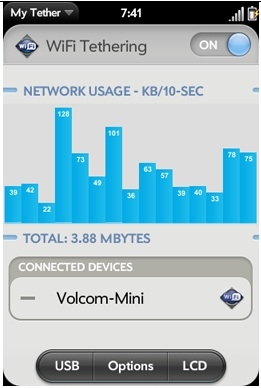
Once installed we were able to launch My Tether and connect to the app pretty quickly. The app looks really nice and has options for connecting over WiFi or USB. It also has some nice graphs that tell you how much data your transferring.
In the performance category we were not really impressed. The connection was very slow and unreliable. We tried several things to get it going like switching on data roaming in the phone app. We toggled the My Tether app on and off but there was no way to get a consistent connection to the Internet. We could always connect to the app, but we could not get to any web pages. Sometimes we could, sometimes we couldn't. It was very disappointing.
Mobile Hotspot
Next we tried the free Mobile Hotspot app. We downloaded 2 ipk files and loaded them up through WebOSQuickInstall. Once installed we connected to the app immediately, but we could not access any web pages right away. After about 30 seconds of being connected to the app we were finally downloading web pages at a comfortable clip. It seems that the app connects to your device quickly, but then takes a little while to route you to the Internet. Once it does it's pretty fast. We got about 1.6 Mb/s download and .21 Mb/s up.

There aren't many options to Mobile Hotspot, but the app does what it says it will do. It turns your phone into a WiFi router.
While My Tether has been around for awhile, and we certainly appreciate the effort by the developers, our experience wasn't so good. We never really got reliable performance and weren't able to get good support. Mobile Hot Spot on the other hand, was simple and much more reliable.
Neither of these apps is supported by Sprint so you'll have to use at your own risk. Some users report getting error messages from Sprint saying the app is not allowed, but we never received anything like that. If you're looking for a way to tether your devices on occasion, either of these apps will fit the bill but the free Mobile Hotspot is probably the one you want.
My Tether
We paid the $15 for access to the My Tether forums and downloaded the app. We assumed paying the $15 would give us an easy to install file and support. While we were able to install the app without rooting the Pre, it wasn't that simple. We first had to download and install the Palm SDK which took awhile, then we were able to install the My Tether. It was not difficult, but it wasn't like we expected.
Once installed we were able to launch My Tether and connect to the app pretty quickly. The app looks really nice and has options for connecting over WiFi or USB. It also has some nice graphs that tell you how much data your transferring.
In the performance category we were not really impressed. The connection was very slow and unreliable. We tried several things to get it going like switching on data roaming in the phone app. We toggled the My Tether app on and off but there was no way to get a consistent connection to the Internet. We could always connect to the app, but we could not get to any web pages. Sometimes we could, sometimes we couldn't. It was very disappointing.
Mobile Hotspot
Next we tried the free Mobile Hotspot app. We downloaded 2 ipk files and loaded them up through WebOSQuickInstall. Once installed we connected to the app immediately, but we could not access any web pages right away. After about 30 seconds of being connected to the app we were finally downloading web pages at a comfortable clip. It seems that the app connects to your device quickly, but then takes a little while to route you to the Internet. Once it does it's pretty fast. We got about 1.6 Mb/s download and .21 Mb/s up.
There aren't many options to Mobile Hotspot, but the app does what it says it will do. It turns your phone into a WiFi router.
While My Tether has been around for awhile, and we certainly appreciate the effort by the developers, our experience wasn't so good. We never really got reliable performance and weren't able to get good support. Mobile Hot Spot on the other hand, was simple and much more reliable.
Neither of these apps is supported by Sprint so you'll have to use at your own risk. Some users report getting error messages from Sprint saying the app is not allowed, but we never received anything like that. If you're looking for a way to tether your devices on occasion, either of these apps will fit the bill but the free Mobile Hotspot is probably the one you want.